
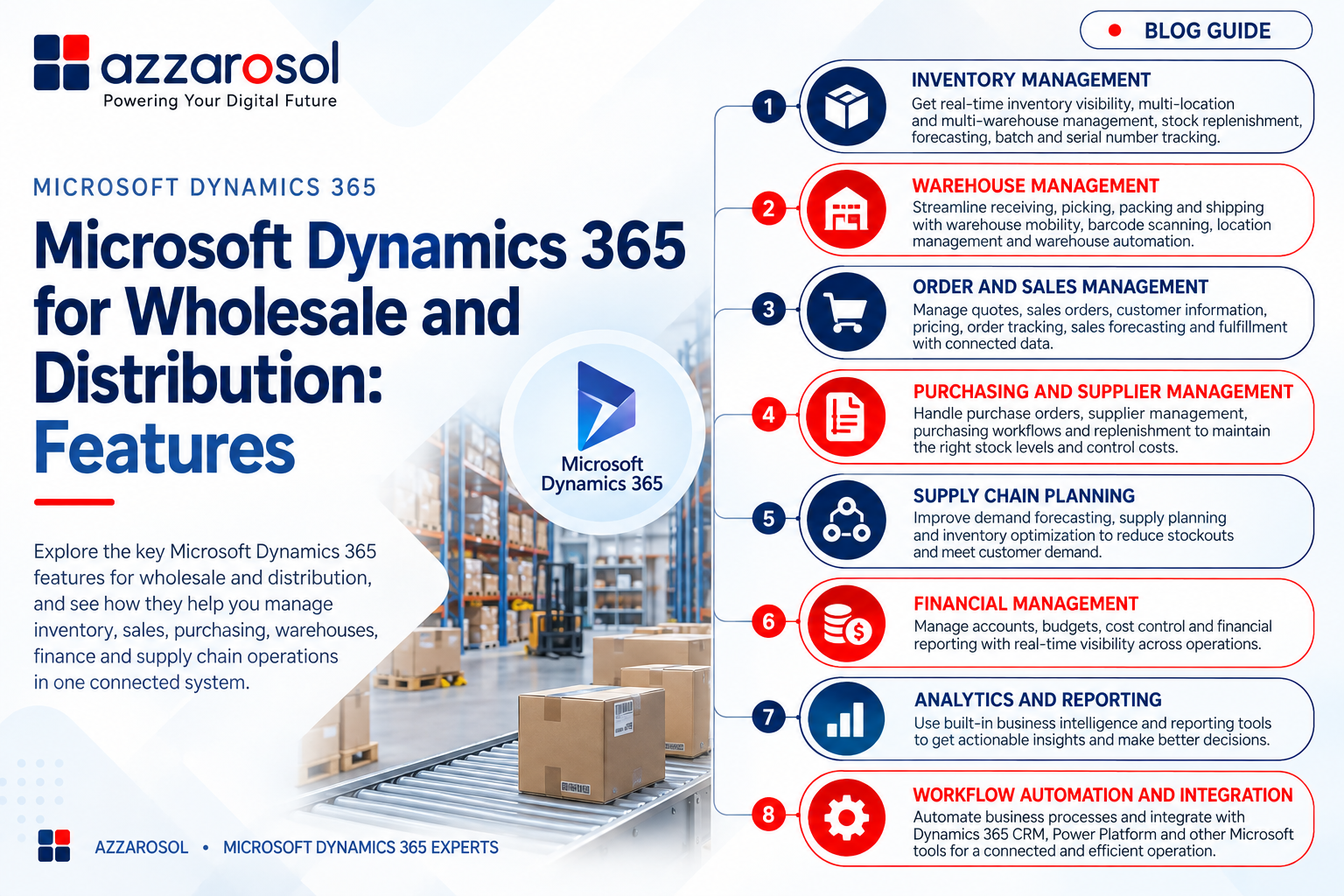
Microsoft Dynamics 365 for Wholesale and Distribution helps wholesalers and distributors manage inventory, sales, purchasing, warehouses, finance, and supply chain operations through connected business processes.
What Features Does Microsoft Dynamics 365 Offer for Wholesale and Distribution?
Microsoft Dynamics 365 offers inventory management, warehouse management, order processing, purchasing, supply chain planning, financial management, analytics, and workflow automation to improve visibility and operational efficiency.
What Is Microsoft Dynamics 365 for Wholesale and Distribution?
Microsoft Dynamics 365 for Wholesale and Distribution is an ERP solution approach that brings core distribution processes into a connected system. Depending on business size and complexity, companies can use Dynamics 365 Business Central or Dynamics 365 Supply Chain Management alongside other Dynamics 365 applications.
The platform can support:
- Inventory and warehouse management
- Sales and order processing
- Purchasing and supplier management
- Supply and demand planning
- Financial management
- Business intelligence and reporting
- Workflow automation
- ERP and CRM integration
The main value is not simply having more software features. It is having business data connected so teams can work from the same information.
What Features Does Microsoft Dynamics 365 Offer for Distributors?
The best Dynamics 365 features for wholesale distribution are those that solve practical problems such as stock shortages, slow fulfillment, manual purchasing, and poor supply chain visibility.
Microsoft Dynamics 365 Inventory Management Features
Inventory accuracy is critical for distributors. A customer may place an order based on available stock, only to find that the product is unavailable or stored at another location.
Dynamics 365 inventory management provides tools for real-time inventory management and ERP inventory tracking across business operations. Businesses can monitor stock levels, movements, availability, and replenishment requirements.
Important capabilities include:
- Real-time inventory visibility
- Multi-location inventory management
- Multi-warehouse management
- Stock replenishment
- Inventory forecasting
- Batch tracking
- Lot tracking
- Serial number tracking
- Product information management
These capabilities help distributors reduce unnecessary stock, avoid stockouts, and improve inventory control. For businesses asking how Dynamics 365 manages wholesale inventory, the key is connected inventory data across purchasing, sales, and warehouse activities.
Microsoft Dynamics 365 Warehouse Management Features
Warehouse efficiency directly affects order fulfillment and customer satisfaction. Manual receiving, picking, packing, and shipping can increase errors and make it difficult to know what is happening inside the warehouse.
Dynamics 365 warehouse management helps organize warehouse operations and supports processes such as receiving, picking, packing, and shipping.
Depending on the solution and setup, businesses can use capabilities such as:
- Warehouse mobility
- Barcode scanning
- Picking and packing
- Warehouse automation
- Inventory movements
- Location management
- Multi-warehouse management
For distributors evaluating Dynamics 365 warehouse management features for wholesalers, the key benefit is better control over physical inventory and warehouse workflows. Faster and more accurate processes can also support better Dynamics 365 order fulfillment for distributors.
Microsoft Dynamics 365 Order and Sales Management
Sales teams need accurate information about products, prices, customers, and orders. When sales and inventory systems are disconnected, employees may spend time checking stock manually or correcting order errors.
Dynamics 365 order management connects sales orders with inventory and fulfillment processes. This supports automated order processing, order tracking, customer management, and better coordination between sales and operations.
Dynamics 365 sales management can help businesses manage:
- Quotes and sales orders
- Customer information
- Product availability
- Pricing management
- Order status
- Sales forecasting
- Order fulfillment
These Dynamics 365 sales features for distributors are useful when a company wants sales teams to have better access to operational information without relying on multiple disconnected systems.
Microsoft Dynamics 365 Purchasing and Supply Chain Features
Purchasing decisions have a direct impact on inventory levels, costs, and customer service. Buying too much ties up working capital, while buying too little can create stock shortages.
Dynamics 365 purchasing management helps businesses manage purchase orders, suppliers, purchasing workflows, and replenishment activities. Supplier management can also give purchasing teams better information when reviewing vendor performance and requirements.
For wholesale businesses, important capabilities include:
- Purchase order management
- Supplier management
- Procurement management
- Demand planning
- Supply planning
- Stock replenishment
- Demand forecasting
- Inventory forecasting
Dynamics 365 Supply Chain Management for distributors can provide deeper capabilities for businesses with complex supply networks and warehouse operations.
Dynamics 365 supply chain features help connect purchasing, inventory, warehouse, logistics, and fulfillment activities. This is especially useful for companies that need stronger supply chain visibility and better demand forecasting for wholesale distribution.
Microsoft Dynamics 365 Financial Management Features
Distribution operations are closely linked to financial performance. Sales, purchasing, inventory, expenses, and payments all affect cash flow and profitability.
Dynamics 365 financial management connects operational transactions with accounting and financial reporting. Businesses can manage areas such as:
- Accounts receivable
- Accounts payable
- Financial reporting
- Cash flow management
- General accounting
- Multi-currency operations
- Multi-company management
This makes Dynamics 365 useful as wholesale accounting software or distribution accounting software when finance teams need operational and financial information in a connected environment.
For businesses considering Dynamics 365 financial management for wholesale businesses, the major advantage is better visibility into the financial impact of everyday distribution activities.
Microsoft Dynamics 365 Analytics and Power BI Integration
Having data is not enough if managers cannot use it to make decisions. Distribution leaders often need answers to questions such as:
- Which products are selling fastest?
- Where are inventory levels too high?
- Which orders are delayed?
- Which suppliers need attention?
- Which locations are most profitable?
- How is sales performance changing?
Dynamics 365 supports business intelligence and real-time analytics, while Power BI integration can help turn business data into dashboards and reports.
This can give management better visibility into inventory, sales, purchasing, finance, and supply chain performance. Instead of waiting for manually prepared reports, teams can use connected data to monitor important business KPIs.
How Dynamics 365 Helps Solve Wholesale Distribution Challenges
The value of Microsoft Dynamics 365 features for wholesale and distribution becomes clearer when they are linked to common business problems.
- Inaccurate inventory: Connected inventory management provides better stock visibility across locations.
- Slow order processing: Automated order processing reduces repetitive manual work and helps connect sales with fulfillment.
- Warehouse errors: Barcode scanning, warehouse mobility, and structured picking and packing processes can improve accuracy.
- Purchasing problems: Demand planning and supplier management help teams make better purchasing decisions.
- Limited supply chain visibility: Connected supply chain information helps managers identify issues earlier.
- Poor reporting: Business intelligence and Power BI integration give decision-makers better access to operational data.
- Disconnected applications: ERP and CRM integration can reduce data silos between business functions.
Workflow automation, role-based access, and business process automation can further help standardize daily operations as the business grows.
Which Dynamics 365 Solution Is Best for Wholesale and Distribution?
The right solution depends on the size, processes, and complexity of the business.
Dynamics 365 Business Central is often suitable for small and mid-sized wholesalers that need connected finance, sales, purchasing, inventory, and operations. Microsoft Dynamics 365 Business Central features for distributors can support core distribution processes without requiring a highly complex enterprise environment.
Dynamics 365 Supply Chain Management is designed for organizations with more advanced supply chain, warehouse, procurement, planning, and distribution requirements.
A business should select the solution based on its actual processes rather than choosing an ERP only because it has a long feature list.
Conclusion:
Microsoft Dynamics 365 for Wholesale and Distribution can help companies connect inventory, warehouse operations, sales, purchasing, finance, and supply chain management in one business environment. Its value comes from using connected data to reduce manual work, improve inventory visibility, strengthen order fulfillment, and support better decisions.
For a growing distributor, the most important step is to map current pain points before selecting modules or starting Dynamics 365 implementation. Focus first on the processes causing the greatest cost or delays, then choose the Dynamics 365 capabilities that directly address them.
If your wholesale or distribution business is dealing with inventory gaps, warehouse inefficiency, disconnected systems, or limited reporting, Azzarosol can help assess your requirements and plan the right Dynamics 365 solution.
Microsoft Dynamics 365 for Wholesale and Distribution can become more than an ERP system when it is aligned with the way your business actually operates. Contact Azzarosol now to discuss your Dynamics 365 ERP requirements, implementation, integration, and support.